
Honeywell 4-in-1 Ultra Slim USB Hub Review: A Compact and Reliable Connectivity Solution
Introduction
In today’s digital world, having multiple USB ports is essential. Whether you are working on a laptop, transferring files, connecting speakers, or using external storage devices, a USB hub can make your life much easier. The Honeywell 4-in-1 Ultra Slim USB Hub is a newly launched accessory designed to expand your connectivity options without taking up much space.
Featuring 1 USB 3.0 port and 3 USB 2.0 ports, this compact hub offers data transfer speeds of up to 5Gbps and universal compatibility with laptops, PCs, speakers, hard drives, keyboards, and many other USB-enabled devices.
In this detailed review, we will explore its design, features, performance, pros and cons, and whether it is worth buying.
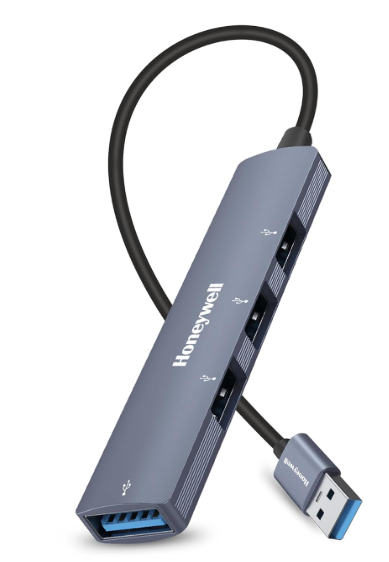
Honeywell 4-in-1 Ultra Slim USB Hub Specifications
| Feature | Details |
|---|---|
| Brand | Honeywell |
| Product Type | USB Hub |
| Ports | 1 x USB 3.0, 3 x USB 2.0 |
| Cable Length | 30 cm |
| Data Transfer Speed | Up to 5Gbps |
| Design | Ultra Slim |
| Compatibility | Universal USB Devices |
| Supported Devices | Laptop, PC, Speaker, Hard Drive, Keyboard, Mouse, Pendrive |
Elegant and Ultra-Slim Design
One of the first things you notice about the Honeywell USB Hub is its sleek and lightweight design. The ultra-slim body makes it highly portable and easy to carry in a laptop bag or backpack.
The compact design is especially useful for professionals, students, and travelers who need additional USB ports while on the move. Despite its small size, the hub feels sturdy and well-built.
The 30cm cable length provides enough flexibility to connect comfortably without creating unnecessary cable clutter on your desk.
Multiple Ports for Better Productivity
Modern laptops often come with limited USB ports. This can become frustrating when you need to connect multiple devices simultaneously.
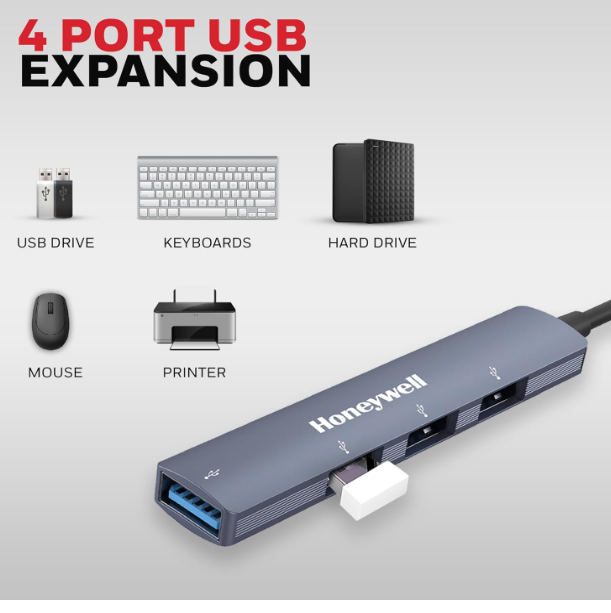
The Honeywell 4-in-1 USB Hub solves this problem by providing:
1 USB 3.0 Port
The USB 3.0 port supports data transfer speeds of up to 5Gbps, making it suitable for:
- External hard drives
- SSDs
- High-speed flash drives
- Large file transfers
3 USB 2.0 Ports
The additional USB 2.0 ports are ideal for:
- Keyboard
- Mouse
- Printer
- Speakers
- USB fans
- Webcam
This combination makes the hub practical for both office and home use.
looking for the watch click herehttps://raunakkumar.com/goboult-mustang-racer-black-blaze-review/
High-Speed Data Transfer Performance
The standout feature of this USB hub is the USB 3.0 port, which delivers transfer speeds of up to 5Gbps.
For users who frequently transfer movies, photos, videos, and office files, this speed can save a significant amount of time compared to traditional USB 2.0 connections.
During normal usage, file transfers remain stable and reliable without noticeable interruptions. The hub performs efficiently for everyday tasks and light professional workloads.
Universal Compatibility
Compatibility is one of the strongest advantages of this Honeywell USB Hub.
The device works with:
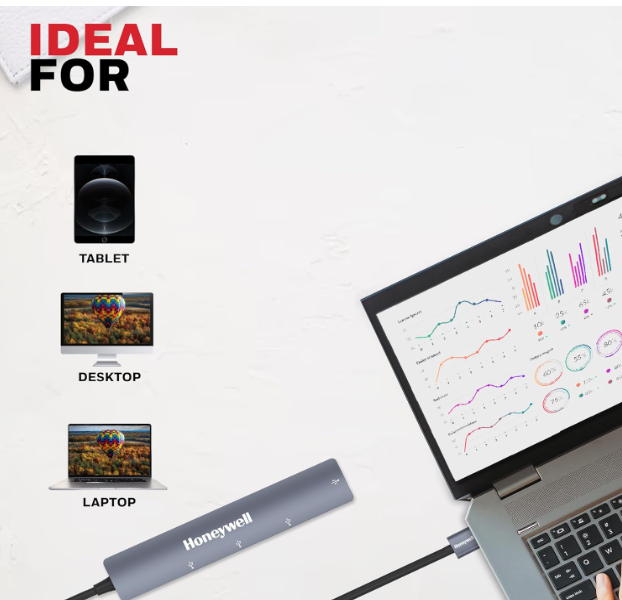
- Windows laptops
- Desktop PCs
- MacBooks
- USB speakers
- External hard drives
- Pendrives
- Keyboards
- Mouse devices
- USB-powered accessories
The plug-and-play functionality means there is no need to install additional drivers in most situations. Simply connect the hub and start using it instantly.
Build Quality and Durability
Honeywell is known for producing reliable electronic accessories, and this USB hub follows the same standard.
The materials used feel durable while keeping the overall weight low. The cable connection appears secure, reducing the chances of accidental disconnections during use.
Although it is lightweight, it does not feel cheap or fragile.
Everyday Use Cases
Here are some practical situations where this USB hub becomes extremely useful:
For Students
Students can connect:
- Pen drives
- Mouse
- Keyboard
- USB speakers
simultaneously without constantly swapping devices.
For Office Professionals
Perfect for connecting:
- External storage
- Keyboard
- Mouse
- Webcam
during work sessions.
For Home Users
Useful for:
- Media transfers
- USB speakers
- Printers
- External hard drives
making daily computing tasks more convenient.
My Personal Experience
After using the Honeywell 4-in-1 Ultra Slim USB Hub for everyday productivity tasks, I found it to be a practical and dependable accessory.
The setup process was effortless. I simply plugged it into my laptop, and all ports became functional immediately without requiring software installation.
The USB 3.0 port delivered smooth file transfers when using an external SSD and flash drive. The three USB 2.0 ports worked perfectly for connecting a mouse, keyboard, and speaker simultaneously.
What impressed me most was the compact design. It easily fits into a laptop sleeve and is convenient to carry during travel.
For basic office work, studying, and general home usage, the hub performed consistently without overheating or connection issues.
Pros and Cons
Pros
✔ Compact and ultra-slim design
✔ High-speed USB 3.0 transfer up to 5Gbps
✔ Three additional USB 2.0 ports
✔ Universal compatibility
✔ Plug-and-play operation
✔ Lightweight and portable
✔ Ideal for laptops with limited USB ports
✔ Reliable everyday performance
Cons
✘ Only one USB 3.0 port
✘ Not suitable for charging multiple high-power devices
✘ No dedicated power adapter support
✘ USB 2.0 ports have slower transfer speeds
Who Should Buy This USB Hub?
This product is ideal for:
- Students
- Office workers
- Remote employees
- Laptop users
- Travelers
- Content creators needing extra USB connectivity
If your laptop lacks sufficient USB ports, this hub offers a simple and affordable solution.
Is the Honeywell 4-in-1 USB Hub Worth Buying?
Yes, the Honeywell 4-in-1 Ultra Slim USB Hub is worth considering if you need a budget-friendly way to expand your USB connectivity.
The combination of one high-speed USB 3.0 port and three USB 2.0 ports provides enough flexibility for most users. Its slim design, universal compatibility, and reliable performance make it a practical accessory for work, study, and entertainment.
While power users may prefer a hub with multiple USB 3.0 ports, casual and professional users will find this device more than adequate for daily tasks.
Why Do You Need a USB Hub?
Explain karo ki modern laptops me ports kam hote ja rahe hain aur USB hub kaise multiple devices connect karne me help karta hai.
Key Features of Honeywell 4-in-1 USB Hub
- Ultra Slim Design
- 5Gbps Data Transfer
- Plug and Play
- Universal Compatibility
- Portable and Lightweight
Performance During Daily Use
Real-world examples:
- Pendrive transfer
- External hard drive connection
- Keyboard and mouse usage
- Speaker connection
Comparison with Ordinary USB Hubs
Ek chhota comparison section:
| Feature | Honeywell USB Hub | Generic USB Hub |
|---|---|---|
| Brand Reliability | Yes | Varies |
| USB 3.0 Port | Yes | Not Always |
| Build Quality | Good | Average |
| Portability | Excellent | Average |
Value for Money
Price ke hisaab se kya mil raha hai aur competitors ke comparison me kaisa hai.
Best Use Cases
- Office Work
- Online Classes
- Work From Home
- Content Creation
- Students
The Honeywell 4-in-1 Ultra Slim USB Hub successfully delivers what it promises: extra connectivity in a compact package.
With fast data transfer speeds, broad device compatibility, and a portable design, it serves as a valuable accessory for anyone who regularly connects multiple USB devices.
If you’re looking for an affordable, reliable, and easy-to-use USB hub for your laptop or desktop, the Honeywell 4-in-1 Ultra Slim USB Hub is definitely worth adding to your setup.
Frequently Asked Questions (FAQs)
Does the Honeywell USB Hub support USB 3.0?
Yes, it includes one USB 3.0 port that supports data transfer speeds of up to 5Gbps.
Can I use this USB hub with a laptop?
Yes, it is fully compatible with laptops, desktop PCs, and many USB-enabled devices.
Is driver installation required?
No. The hub supports plug-and-play functionality and generally works without installing drivers.
Can I connect an external hard drive?
Yes, the USB 3.0 port is suitable for connecting external hard drives and SSDs.
Does the hub support MacBook devices?
Yes, it can work with MacBooks that support USB connectivity through compatible adapters if required.
Is this USB hub good for office work?
Absolutely. It is useful for connecting keyboards, mice, storage devices, printers, and other peripherals simultaneously.